As I previously mentioned, I received multiple calls and emails from a women’s business organization trying to scam me. The same week, my family member got a phishing email that went wrong, and a client almost got conned out of their domain name.
As a web pro, I’ve seen many scams. Contests, awards, and other schemes are designed to steal money from unsuspecting people. These scams are starting to look more official with logos and expertly crafted copy, thanks to artificial intelligence software.
One scam my client received was an official bill from a domain registration company.
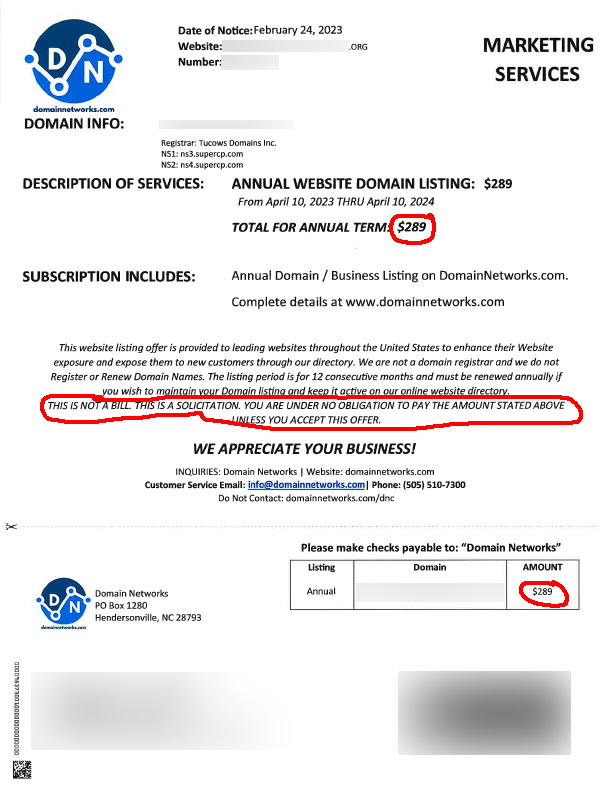
It came in the mail and looked official. My client’s bookkeeper emailed me and said, “I thought you handled the domain registration?” I didn’t, but I knew they were on autopay with a company other than the one she mentioned. I logged in and said your domain isn’t due until June, but you’re credit card expires this month, so have the president log in and update that. He contacted me this time with the bill, and I said that’s not your domain registration; login <insert website of their domain registration> and update your info. Their domain registration is roughly $20/year. A little expensive, but not the $289 this company was trying to charge them. If you look closely at the invoice, it states it isn’t a bill but a solicitation. That’s how they get away with tricking you.
Always log into your domain registrar directly or talk to your web designer; otherwise, you can pay a scammer or even lose your domain name.
I figured I would be in the clear after two scams in one week. BOY, was I wrong. My family member received a bill from Geek Squad that they thought was something their late husband signed up for, so she called the number on the invoice to cancel. They told her that she was to receive her money back. Somehow, they tricked her into downloading an app and giving them access to their online banking. They tried to drain her bank account and obtain more access. Luckily, she knew me, and I caught them, uninstalled their software, and we called the bank. The money never made it out of the bank, but it is stuck in limbo, waiting for some department to return the money to her new bank account we had to create. We also had to close her credit cards. We locked down her credit report, online banking, iPad, and email address. We made sure everything had multifactor authentication. We’re still waiting on that bank a week later.
I want to dissect this one a little further because after talking to my friends at The Paladin Group, I discovered this scam is a HUGE problem, and it is just older people that have fallen to it.
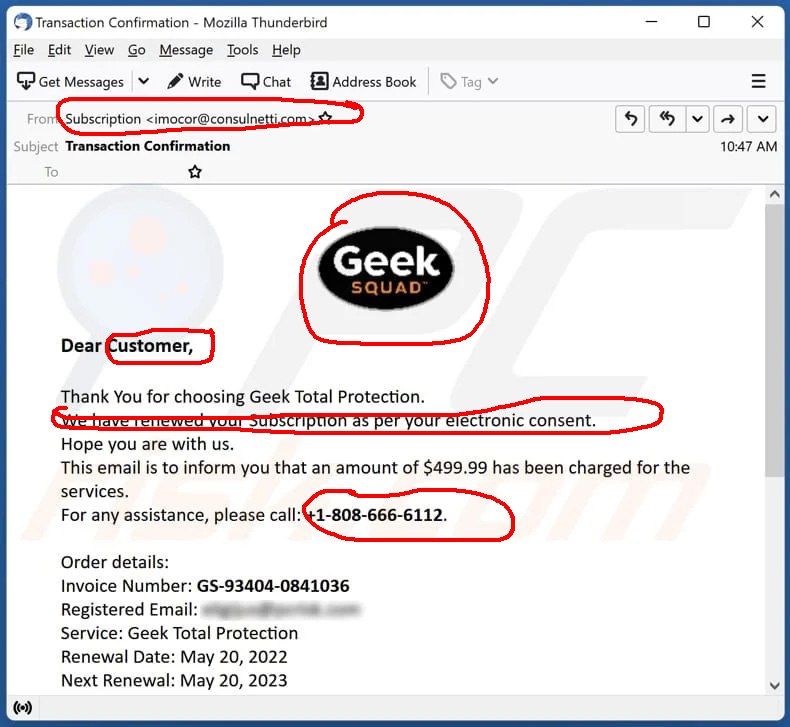
- The Geek Squad is a tradename for the people who fix computers at Best Buy. They do not send invoices or anything using the Geek Squad Brand. Red Flag Number One
- Whenever you get an invoice by email, you must examine it because many of them are not legit. Look how it is addressed. Does it say “User, Customer, Sir or Madam, To Whom It May Concern”? That’s a Second Red Flag.
- What’s the return address if you hit reply on the email? Are they using Gmail or another domain name besides the official BestBuy.com email address? That’s Red Flag, number three.
- There is a phone number in the email that doesn’t match the official number on the BestBuy.com website. DO NOT CLICK ON ANY LINKS in the email. Go to BestBuy.com directly. If it doesn’t match, do not call the number. There’s your red flag.
- There is a link in the email, and when you hover your cursor over it, it takes you somewhere other than BestBuy.com; there is another red flag. Seriously, don’t click on email links unless you know it is a legitimate email. Anything from Geek Squad is not.
- The email has an attachment like .doc, docx, pdf, exe, zip, etc. DO NOT OPEN IT. It’s malware, and that is the HUGEST RED FLAG of them all.
- The language and formatting are odd. Does it use queries or other wording you would not hear an American English speaker use? Are commas and periods in the wrong places and missing spaces? Or maybe they have too many spaces. Are there no spaces between paragraphs? Poor grammar, overly formal language, and an odd layout are usually signs of a fake email.
This article contains a bunch of examples from Geek Squad Scams. Look at them for reference.
Many people are tricked by these phishing emails because they create a sense of urgency, just like marketers. If you’re not sure, don’t click on it. Never give anyone you don’t know access to your computer, online banking, iPad, email address, etc. Do not give credit card numbers, social security numbers, or usernames/passwords to people by email or phone, especially if you don’t know them. If you have an issue with your device, contact the store or manufacturer you purchased it from.
